

auto create & update
Up to this point, you've been learning how to enrich your automated tests with metadata — titles, fields, steps, suites, parameters. You might be wondering: where does all that metadata actually go?
The answer depends on a setting in Qase that most teams never think about — until something unexpected happens.
The problem this solves
Most teams start their automation journey in one of two places:
Scenario A: "We have test cases in Qase, and now we're automating them." You've been managing test cases manually — writing descriptions, assigning priorities, organizing into suites. Now you're writing automated tests and linking them with QaseId. The test cases already exist. You just want results to flow in.
Scenario B: "We write tests in code first, and Qase should reflect what we have." Your team is automation-first. Tests live in the repo. You don't want to create test cases in Qase by hand and then link them — that's double the work. You want Qase to learn about your tests from the results themselves.
Auto-create and auto-update exist for Scenario B — and for the many teams that live somewhere in between.
Auto-create: letting Qase learn from your tests
When the reporter sends a result that doesn't match any existing test case, Qase has a choice: store the result as an orphan, or create a test case for it automatically.
With auto-create enabled (the default), Qase creates a test case from the result. Everything you annotated in code — title, suite, description, fields, steps, parameters — becomes a real test case in your repository. The next time that test runs, Qase matches it to the case it created, and you start building history.
This is where the metadata work from earlier pages pays off. If you annotated your test with @qase.fields(("priority", "high"), ("layer", "API")), the auto-created test case in Qase will have priority "High" and layer "API." If you defined steps, the test case will have steps. Your code becomes the source of truth, and Qase reflects it.
How Qase matches results to test cases
When a result arrives, Qase tries to find an existing test case using a two-step lookup:
QaseId?
enabled?
enabled?
The important detail: unlinked tests are matched by title and suite path together. A test called "Login works" in suite "Auth > Smoke" is different from "Login works" in suite "Auth > Regression." This means your suite structure (from describe blocks, packages, or explicit @qase.suite() annotations) matters for matching — not just the test name.
This also means: if you rename a test or move it to a different suite, Qase sees it as a new test. The old test case stays, a new one is created, and you lose the history chain. This is the same identity concept from the Linking Tests page — linking with QaseId gives you a stable identity that survives refactoring. Auto-create gives you convenience, but the identity is fragile.
What gets created
You control which fields flow from results into new test cases. In Project Settings > Test Runs > Automated testing, you'll find checkboxes for each field:
- Always included: Title (mandatory — every test case needs a name)
- On by default: Description, preconditions, postconditions, suite, steps, parameters, severity, priority, layer, type, behavior, muted/flaky status, tags
- Automatic: Cases created from automated results are marked as "Automated" by default (controlled by a separate toggle)
You can uncheck fields you don't want. For example, if your code annotations don't include severity and you'd rather set it manually in Qase, uncheck it — auto-create won't populate it, and you can fill it in later.
Status filter: not every result creates a case
By default, only passed results create test cases. A test that fails on its first run doesn't get a case — the assumption is that you're still iterating on it.
You can change this to "All statuses" if you want every test to create a case regardless of outcome. Teams that use Qase for tracking test development (not just test execution) often prefer this.
Auto-update: keeping Qase in sync with your code
Auto-create handles the first time. Auto-update handles every time after that.
When you change a test's description in code, add a step, or update its priority annotation — should the test case in Qase reflect that change? If your code is the source of truth, the answer is yes. That's what auto-update does.
Auto-update is off by default. This is intentional. Many teams have test cases that were carefully written by QA engineers — with detailed descriptions, edge case notes, and context that doesn't exist in code. Turning on auto-update without thinking could overwrite that work.
When to turn it on
Auto-update makes sense when:
- Your team has adopted the test-as-code approach — metadata lives in annotations, and the repo is the source of truth
- You want Qase to stay in sync without anyone manually updating test cases after code changes
- Your automated tests are the primary (or only) documentation of what's being tested
Auto-update is risky when:
- You have manually curated test cases with rich descriptions that don't exist in code
- Multiple people edit the same test cases — some in Qase, some in code
- You're not yet annotating tests with enough metadata to replace what's in Qase
Granular control
Auto-update gives you fine-grained control over what gets overwritten:
- Which fields: Choose exactly which fields can be updated from results. You might allow steps and parameters to sync from code, but keep description and priority under manual control.
- Which statuses: Update from passed results only, or from all statuses.
- Which test types: Update all test cases, only manual ones (to "automate" them), or only already-automated ones (to keep them current).
This granularity exists because the real world is messy. You might want auto-update for steps (they change with the code) but not for description (your QA lead writes better descriptions than your annotations). You can have both.
Where titles live — and why it matters
When you look at a test run in Qase, you're not looking at your test cases directly. You're looking at results — and each result carries its own snapshot of the test case data at the time it was recorded. Title, description, fields, steps — all frozen at the moment the reporter submitted them.
This is by design. If someone renames a test case next week, your historical results still show what the test was called when it actually ran. You get an accurate record of what happened, not a retroactively edited one.
But this creates a question: whose title should the result show?
By default, results display whatever the reporter sends. If your test function is called test_user_can_checkout and you don't set a custom title, that's what appears in the run. If you use qase.title('User can complete checkout'), that's what appears instead.
Some teams prefer a different approach. They curate test case titles in Qase — written by QA leads, reviewed for clarity, consistent in style — and they don't want the reporter overwriting those titles with whatever the developer named the function. For this, there's a project setting: "Use test case titles from repository." When enabled, results display the title stored in the Qase test case, ignoring what the reporter sent.
This works well — until you also enable auto-update with the title field selected. Now you've told Qase two contradictory things: "ignore the reporter's title on results" and "update the test case's title from the reporter." The reporter's title overwrites the test case, and then the result displays the test case's title — which is now the reporter's title anyway. Qase will show you a warning if you enable both.
The fix is simple: decide who owns titles. If your team curates titles in Qase, turn on "use repository titles" and leave title out of auto-update. If your team treats code as the source of truth, leave the default and optionally enable auto-update for titles. Either approach works — just don't do both.
The bigger picture
Auto-create and auto-update are the bridge between two worlds: the code your developers write and the test management your QA team relies on. They're what make the metadata annotations from earlier pages useful beyond reporting — your code doesn't just produce results, it maintains your test repository.
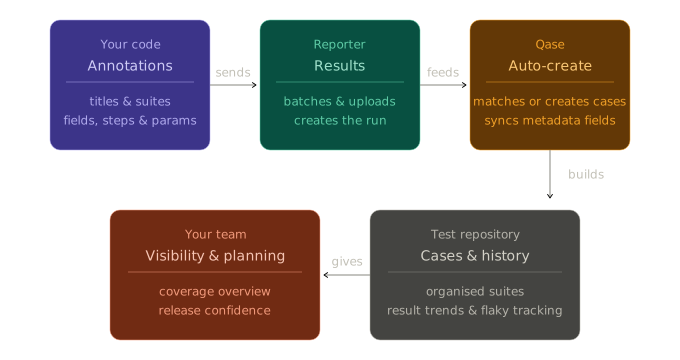
The practical adoption path for most teams:
- Start with auto-create on, auto-update off. Let Qase learn about your tests. Review what gets created.
- Add metadata gradually. As you annotate tests with titles, fields, and steps, the auto-created cases get richer.
- Turn on auto-update selectively. Start with steps and parameters — they change with the code and are tedious to update manually. Leave description and priority under manual control until you're confident your annotations are good enough.
- Graduate to full sync when your team agrees that code is the source of truth.
Where to find these settings: Project Settings > Test Runs > Automated testing. Every setting on this page is per-project — you can have different policies for different projects.
Updated 5 months ago