

reporter lifecycle
Every Qase reporter follows the same three-phase lifecycle: start, report, complete. Understanding this flow is the foundation for everything else in this section — once you see what happens by default, you'll know exactly which parts to customize.
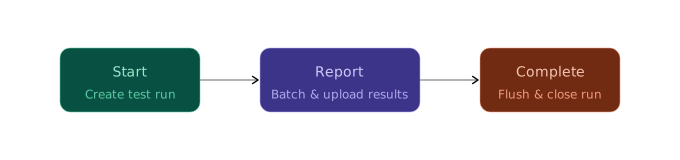
Start
When your test suite begins, the reporter creates a new test run in Qase. This happens automatically — you don't trigger it. The run appears in your Qase dashboard immediately, titled something like Automated run 2025-01-15T10:30:00Z.
Behind the scenes, the reporter calls the Qase API to create the run, gets back a run ID, and holds onto it for the rest of the session. If you're watching your terminal, you won't see much — the reporter is intentionally quiet unless something fails.
One thing worth knowing: the reporter also sets the run ID as an environment variable (QASE_TESTOPS_RUN_ID) after creating the run. This matters if you're running parallel test workers — they can pick up the same run ID and report into a single run instead of creating separate ones.
Report
As each test finishes, the reporter collects the result — title, status, duration, steps, attachments, parameters, everything you've annotated — and adds it to an internal queue.
The reporter doesn't wait until the end to send results. It uploads them in batches while your tests are still running. By default, a batch is sent every 200 results. For most test suites, this means results appear in Qase progressively — you can watch the dashboard fill up in near-real-time while the suite is still executing.
If a test fails, the reporter logs a direct link to that failure in the Qase dashboard. You'll see it in your terminal output:
See why this test failed: https://app.qase.io/run/DEMO/dashboard/123?source=logs&search=DEMO-42This is one of the small things that makes automated reporting worth the setup — you don't have to go hunting for the failure in the UI.
Complete
After the last test finishes, the reporter flushes any remaining results that haven't been sent yet, waits for all uploads to finish, and then completes the run.
Completing a run is what transitions it from "In Progress" to a final status (Passed or Failed) in Qase. It's also what triggers any downstream behaviors you've configured in your Qase project — like notifications or webhook integrations.
By default, the reporter always completes the run. This is the right behavior for most setups. But there are cases where you don't want this — for example, if multiple CI jobs report into the same run and only the last one should complete it. We'll cover that in the Test Runs page.
The whole flow, in detail
What you can customize
Now that you see the default flow, here's what each page in this section lets you change:
- Test Runs — the run title, description, tags, and whether the reporter completes the run at the end. You can also point the reporter at an existing run instead of creating a new one.
- Environments — attach an environment slug to the run so Qase knows whether these results came from staging, production, or your local machine.
- Test Plans — create the run under a specific test plan, tying automated results to a planned testing cycle.
- Qase Project Settings — control what Qase does with results after they arrive: auto-creating test cases, auto-updating existing ones, and which statuses trigger creation.
- Configurations — tag the run with browser/OS/device combinations so you can compare results across configurations.
Updated 5 months ago