

configurations
If you run the same test suite on Chrome, Firefox, and Safari, you now have three test runs. Without context, they're three identical-looking entries in your runs list. Someone asks "did we test Safari?" and you're scrolling through timestamps trying to remember which run was which.
Configurations solve this. They're labels you attach to a test run that say what platform this run was executed on. Browser, operating system, device, screen resolution — whatever dimensions matter to your team.
How configurations work in Qase
Configurations are organized into groups and values:
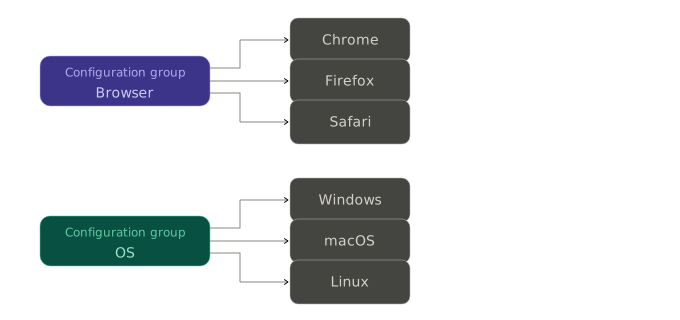
You create these in Qase under Project Settings → Configurations. Each group holds a set of values. When you create a test run — manually or through the reporter — you pick one value from each relevant group.
This is different from parameters, which we covered earlier. Parameters are per-test: "this login test ran with admin credentials and with guest credentials." Configurations are per-run: "this entire run was executed on Chrome on macOS." Parameters vary within a run. Configurations describe the run itself.
Tagging runs from the reporter
You tell the reporter which configuration values apply to this run. In your qase.config.json:
{
  "testops": {
    "configurations": {
      "values": [
        { "name": "Browser", "value": "Chrome" },
        { "name": "OS", "value": "Linux" }
      ],
      "createIfNotExists": true
    }
  }
}
Or via environment variables — which is more practical in CI:
export QASE_TESTOPS_CONFIGURATIONS_VALUES="Browser=Chrome,OS=Linux"
export QASE_TESTOPS_CONFIGURATIONS_CREATE_IF_NOT_EXISTS=true
The name is the configuration group, the value is the specific item within that group. When the reporter creates the test run, it looks up these groups and values in Qase, finds (or creates) them, and attaches them to the run.
createIfNotExists
createIfNotExistsIf you set createIfNotExists to true, the reporter will create any missing configuration groups and values automatically. This is convenient when you're getting started — you don't have to pre-create everything in the Qase UI. But once your team stabilizes on a set of configurations, you might want to set this to false so that a typo like "Chorme" doesn't silently create a new configuration instead of failing loudly.
If createIfNotExists is false and a group or value doesn't exist, the reporter skips it and logs a debug message. The run still gets created — it just won't have that configuration attached.
A use case: CI matrices
This feature clicks into place when you're running a CI matrix. In GitHub Actions, for example:
strategy:
  matrix:
    browser: [chromium, firefox, webkit]
Each matrix job runs the same tests on a different browser. You set the configuration dynamically:
env:
  QASE_TESTOPS_CONFIGURATIONS_VALUES: "Browser=${{ matrix.browser }}"
  QASE_TESTOPS_CONFIGURATIONS_CREATE_IF_NOT_EXISTS: true
Now each job creates its own test run in Qase, tagged with the browser it tested. Your runs list goes from three mystery runs to three clearly labeled ones. You can filter by configuration, compare pass rates across browsers, and answer "did we test Safari?" in two seconds.
Updated 5 months ago