

Deploy
Running in CI
You've been running tests locally with reporting turned on. Now you want the same thing to happen automatically — every push, every PR, every nightly regression. CI is where reporting becomes genuinely useful, because it's where results accumulate consistently enough to show trends, catch regressions, and build the history that makes Qase valuable.
The good news: if reporting works locally, it works in CI. The reporter doesn't know or care where it's running. It reads the same config file, the same environment variables, the same everything. The only things that change are how you inject secrets and how you manage the run lifecycle when multiple jobs are involved.
The basic pattern
Locally, you probably have QASE_MODE=testops and your API token set in your shell. In CI, you do the same thing — but through your CI platform's secrets and environment variable system.
The recommended setup:
- Keep
mode: "off"in yourqase.config.json— this is your repo's default. Developers running tests locally don't accidentally push results to Qase. - Set
QASE_MODE=testopsas a CI environment variable — this overrides the config file and turns reporting on only in CI. - Store your API token as a CI secret — never commit it to the repo. Inject it as
QASE_TESTOPS_API_TOKEN.
That's it. Three environment variables in your CI config, and reporting is live:
env:
  QASE_MODE: testops
  QASE_TESTOPS_API_TOKEN: ${{ secrets.QASE_API_TOKEN }}
  QASE_TESTOPS_PROJECT: DEMO
Everything else — run title, batch size, fallback mode — comes from your qase.config.json that's already in the repo. CI just layers the secrets and the mode switch on top.
A GitHub Actions example
Here's a minimal workflow that runs Playwright tests and reports to Qase:
name: Tests
on: [push, pull_request]

jobs:
  test:
    runs-on: ubuntu-latest
    steps:
      - uses: actions/checkout@v4
      - uses: actions/setup-node@v4
        with:
          node-version: 22
      - run: npm ci
      - run: npx playwright install --with-deps
      - run: npx playwright test
        env:
          QASE_MODE: testops
          QASE_TESTOPS_API_TOKEN: ${{ secrets.QASE_API_TOKEN }}
          QASE_TESTOPS_PROJECT: DEMO
That's a complete, working CI integration. The reporter creates a run, uploads results in batches as tests finish, and completes the run when the suite ends — exactly like it does locally.
We use GitHub Actions for examples throughout these docs. The pattern is identical on any CI platform — GitLab CI, Jenkins, CircleCI, Bitbucket Pipelines, Azure DevOps, or anything else that lets you set environment variables on a job. Swap
${{ secrets.QASE_API_TOKEN }}for your platform's secret syntax and you're done.
Linking the CI build back to Qase
When something fails, you want to jump from the Qase dashboard straight to the CI build that produced the failure. Set the run description to include your CI build URL:
env:
  QASE_TESTOPS_RUN_DESCRIPTION: "CI build: ${{ github.server_url }}/${{ github.repository }}/actions/runs/${{ github.run_id }}"
Now every run in Qase has a clickable link back to the exact GitHub Actions run that produced it. Your team stops asking "which build was this from?"
When one job isn't enough: parallel and sharded CI
The basic pattern works perfectly when you have a single CI job running all your tests. But real-world CI often looks different:
- Sharded Playwright — tests split across 4 parallel jobs to finish faster
- Matrix builds — the same tests running on Chrome, Firefox, and Safari
- Separate suites — unit tests, integration tests, and e2e tests in different jobs
In all these cases, you want the results to land in one run in Qase, not four separate runs. This requires a small change to the lifecycle.
The problem
By default, each reporter instance creates its own run and completes it when done. If you have four parallel jobs, you get four separate runs — each with a quarter of your results. Not useful.
The solution
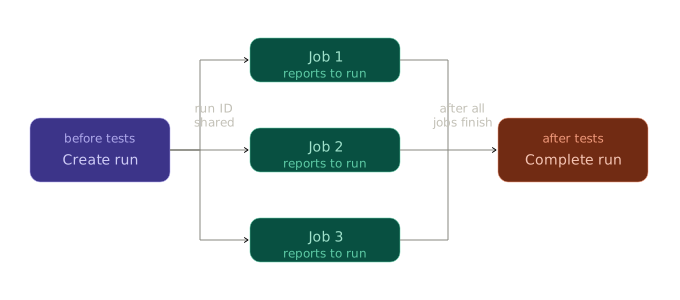
- Create the run externally — before any test job starts, create a run using the Qase CLI (
qasectl) or API and capture the run ID. - Pass the run ID to all jobs — set
QASE_TESTOPS_RUN_IDso every reporter instance reports to the same run. - Disable auto-completion — set
run.complete: falseso no single job closes the run while others are still running. - Complete the run externally — after all jobs finish, complete the run using the CLI or API.
Here's what that looks like in GitHub Actions:
jobs:
  create-run:
    runs-on: ubuntu-latest
    outputs:
      run-id: ${{ steps.create.outputs.run-id }}
    steps:
      - name: Create Qase run
        id: create
        run: |
          qasectl testops run create \
            --project DEMO \
            --token ${{ secrets.QASE_API_TOKEN }} \
            --title "CI Run #${{ github.run_number }}"

  test:
    needs: create-run
    strategy:
      matrix:
        shard: [1, 2, 3, 4]
    runs-on: ubuntu-latest
    steps:
      - uses: actions/checkout@v4
      - run: npm ci
      - run: npx playwright test --shard=${{ matrix.shard }}/4
        env:
          QASE_MODE: testops
          QASE_TESTOPS_API_TOKEN: ${{ secrets.QASE_API_TOKEN }}
          QASE_TESTOPS_PROJECT: DEMO
          QASE_TESTOPS_RUN_ID: ${{ needs.create-run.outputs.run-id }}
          QASE_TESTOPS_RUN_COMPLETE: false

  complete-run:
    needs: [create-run, test]
    if: always()
    runs-on: ubuntu-latest
    steps:
      - name: Complete Qase run
        run: |
          qasectl testops run complete \
            --project DEMO \
            --token ${{ secrets.QASE_API_TOKEN }} \
            --id ${{ needs.create-run.outputs.run-id }}
Qase also provides ready-to-use GitHub Actions for run management: qase-tms/gh-actions/run-create and qase-tms/gh-actions/run-complete.
The if: always() matters
if: always() mattersNotice if: always() on the complete-run job. Without it, if any test job fails, GitHub Actions skips the completion step — and your run stays open forever. if: always() ensures the run gets completed regardless of test outcomes.
What about the config file in CI?
You don't need a separate config file for CI. The layered config system we covered earlier handles this naturally:
qase.config.jsonholds your defaults:mode: "off",run.title,batch.size,fallback: "report"- CI environment variables override what needs to change:
QASE_MODE=testops,QASE_TESTOPS_API_TOKEN
One config file, one source of truth, CI just flips the switches.
Quick checklist
Before your first CI run with reporting enabled:
- API token stored as a CI secret (not in the repo)
-
QASE_MODE=testopsset on the test step -
QASE_TESTOPS_PROJECTset (or in your config file) - If parallel:
QASE_TESTOPS_RUN_IDshared across jobs,run.complete: false - If parallel: a final step to complete the run with
if: always()(or equivalent)
Updated 5 months ago